
Equipment health,
explained.
Nuclearn Equipment AI reads your sensor trends, work orders, condition reports and operator rounds. It scores each piece of equipment with the findings and evidence behind the score, and checks your PM intervals against the industry PM basis. Your engineers see what needs attention first, and why.
- Uses your PI, work order and CR data
- Single-tenant, hosted by Nuclearn
- Signs in through Nuclearn
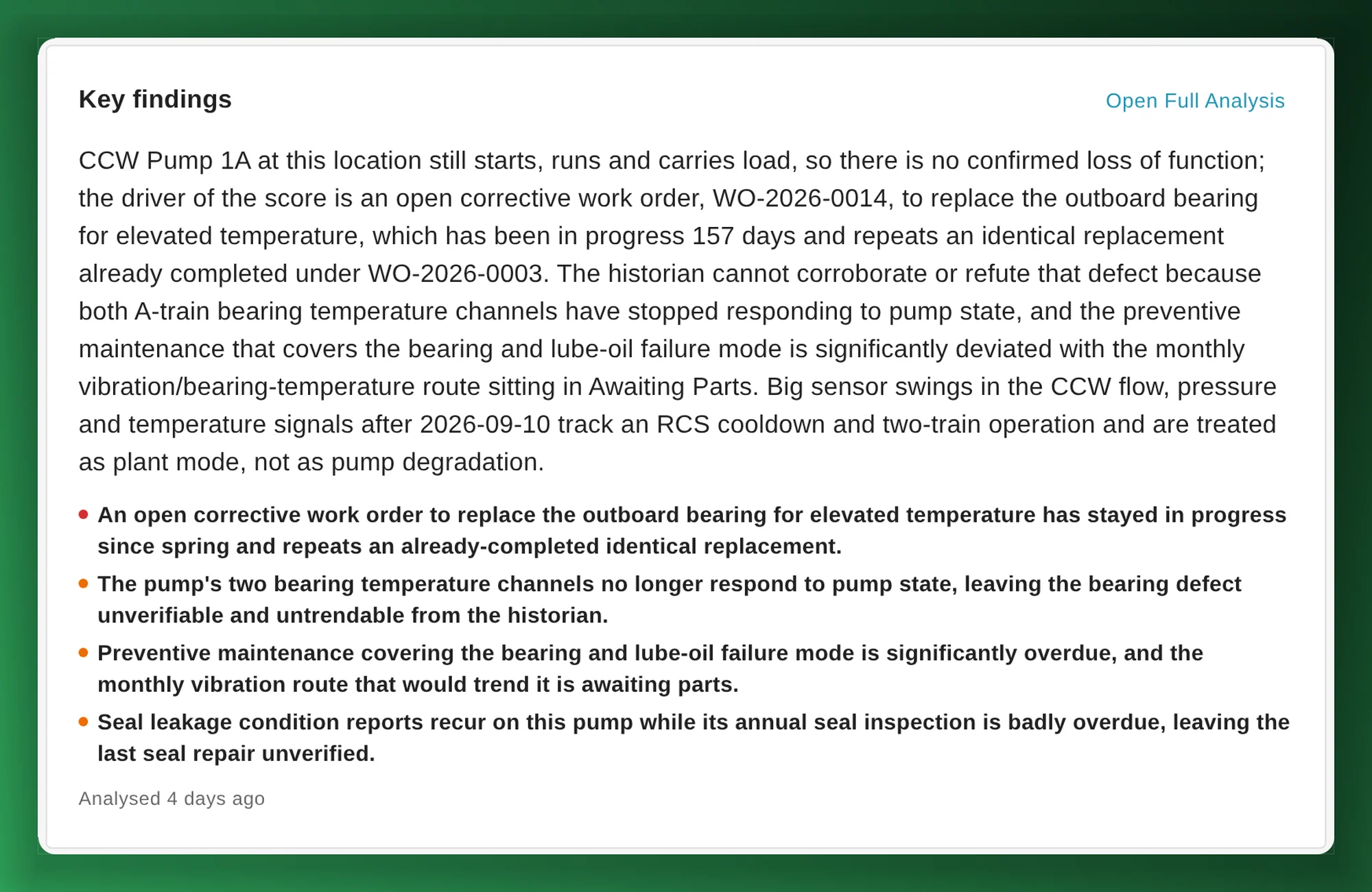
Screenshots on this page show Nuclearn Equipment AI running on data from a simulated plant, not a real one.
- Backed by NuclearnAI software built for nuclear plants since 2021
- Over 70 facilitiesNuclearn products serve sites in North America and the U.K.
- ISO/IEC 27001:2022Certified information security management
From the site heat map to the pump that needs a look.
Your plant already records how its equipment is doing, across the historian, work orders, condition reports and rounds. Equipment AI reads them together for each location and writes down what it found.
See what needs attention across the site
Health by site, unit and system on one heat map, the issues driving each score, and a click from the station down to the pump.
See site health → System engineersRead why, with the evidence
For each location: a health score, the key findings with the sensor values and records behind them, recommended actions by priority, and how confident the analysis is.
See the analysis → Maintenance and PM ownersCheck PM intervals against the industry basis
Each PM's defined interval and last completion, against the recommended interval for that equipment's criticality, duty and service.
See PM intervals → Monitoring and diagnosticsTriage alarms with likely causes
Each alarm firing sorted as nuisance, real and monitor, or real and act, with ranked causes, cited evidence, and actions marked online or out of service.
See alarms → Engineers troubleshootingAsk about any set of sensors
Pick the sensors and locations you care about and ask in plain language. Answers come with plots, statistics and the work history behind them.
See questions → Equipment reliabilityFresh scores before each health review
Run the analysis daily, weekly or on your own schedule, and see which data sources have gone quiet.
See the details →The data is already there. Reading it all is the job.
A system engineer's picture of a pump comes from the historian, the work order history, the condition reports, the operator rounds and the PM program, each kept in its own system. Pulling them together for a health report or a meeting is slow work, and it happens on a calendar, not when a trend turns.
Most of a plant's work is periodic, so knowing which PMs run more or less often than the equipment needs is part of the same picture.
Equipment AI reads it all for each location, scores what it sees, and shows its working.
INL, citing the Nuclear Energy Institute: more than 80% of the work historically performed in a US nuclear plant.
INL's figure describes the industry, not results from Nuclearn Equipment AI. Source at the foot of the page.
From your plant's data to a score you can read
Equipment AI works from the hierarchy and records you already keep.
Bring in your data
Load your PI Asset Framework hierarchy, then send sensor data, work orders, condition reports and operator rounds from your side.
Equipment AI reads it
For each location it follows your plant's analysis procedure: sensors first, then work and condition history and PM adherence.
Your engineers act
Scores roll up by system, unit and site. Engineers read the findings, add feedback for the next run, and decide what to do.
A health score you can read, not just a number.
Each location gets a score from 0 to 100, a verdict of healthy, watch or critical, and the reasons: key findings graded by severity, each with the sensor values, baselines, setpoints and records behind it. Recommended actions come ranked by priority, with the data the analysis reviewed and how confident it is.
- Your plant edits the analysis procedure and the scoring rubric.
- Engineers add feedback that the next run takes into account.
- A written report with citations for each location.
An analysis is advice to your engineers, not an engineering disposition.
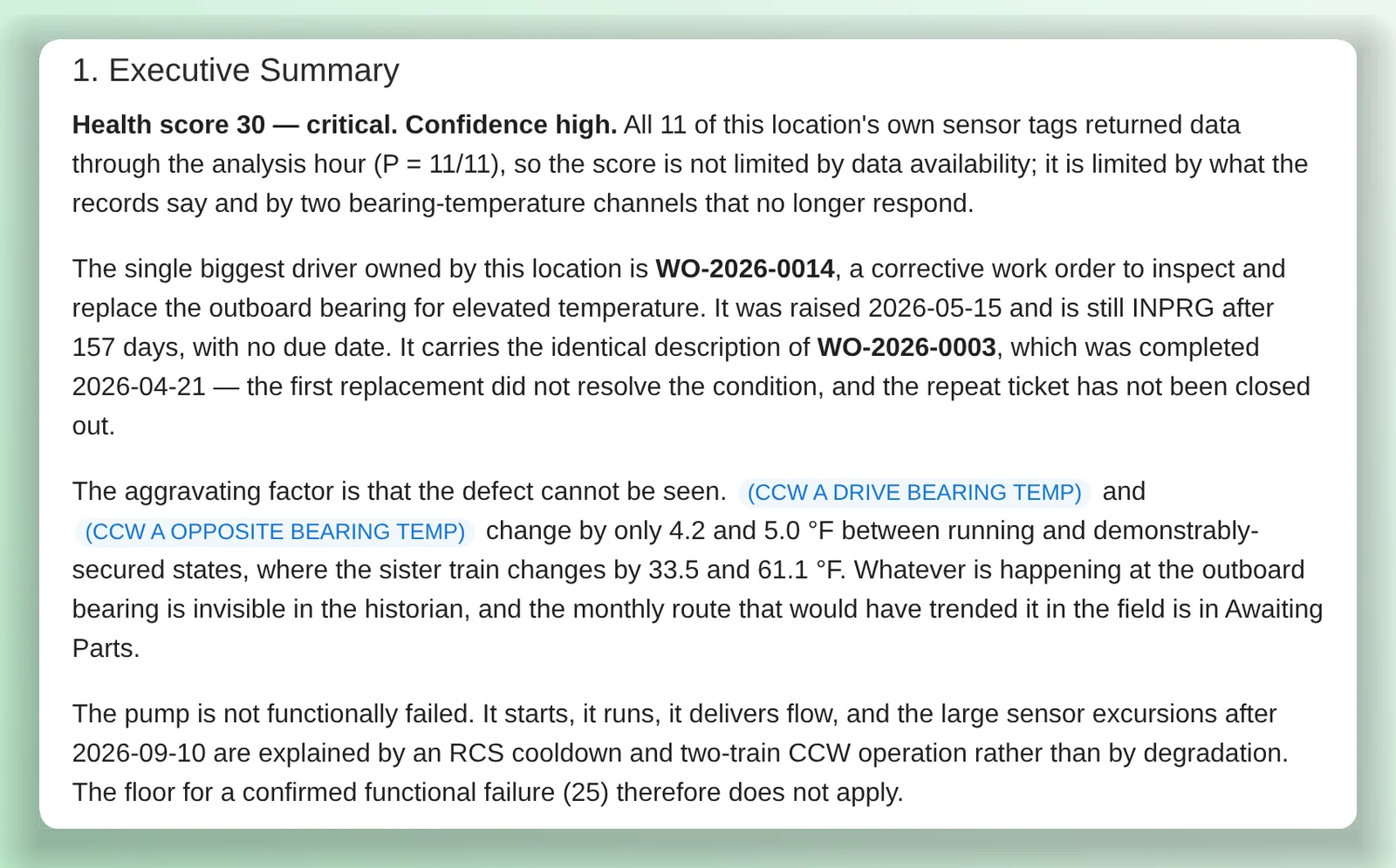
From the station to the pump in a few clicks.
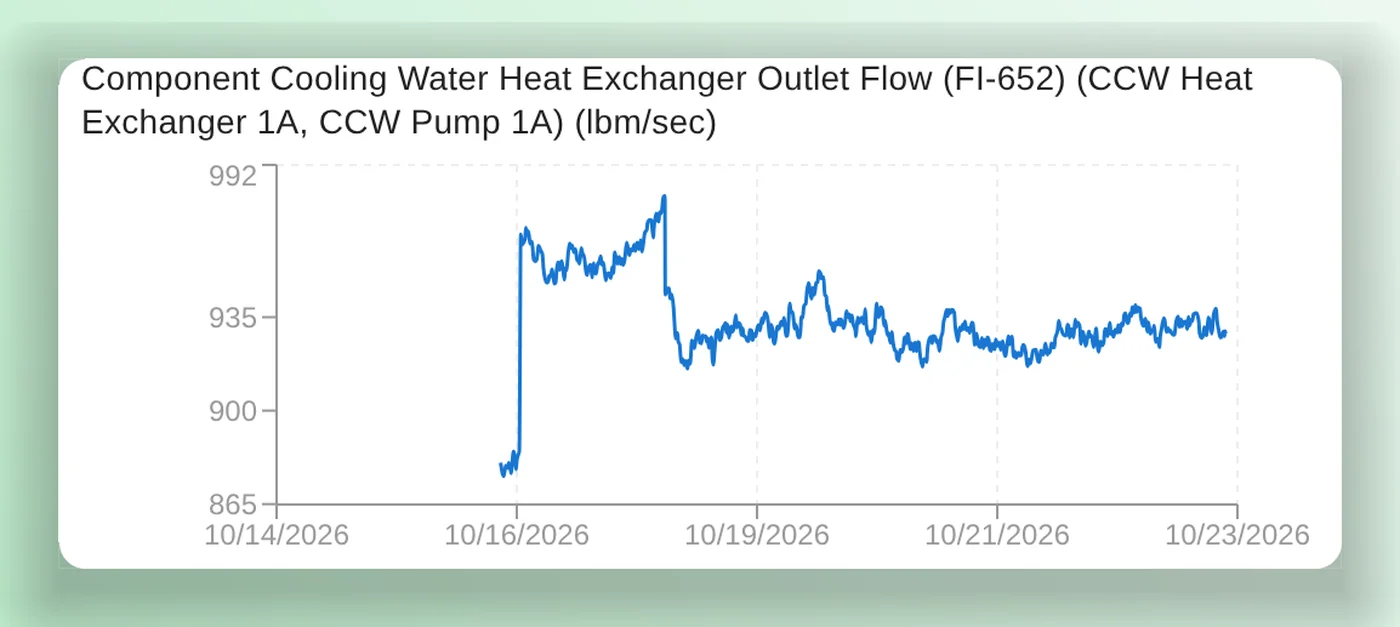
Health rolls up by site, unit and system, as a heat map or a table, coloured by health or by PM compliance. The top drivers list what is behind each score. Open a system to see its locations grouped as critical, watch or healthy, with their sensor trends beside them.
- Show every sensor, or only the ones the AI has referenced. Filter by component type, or search for a location ID.
- A health history for each location, with work orders, condition reports and rounds on the same timeline.
- A notice when a data source has gone quiet or scores are out of date.
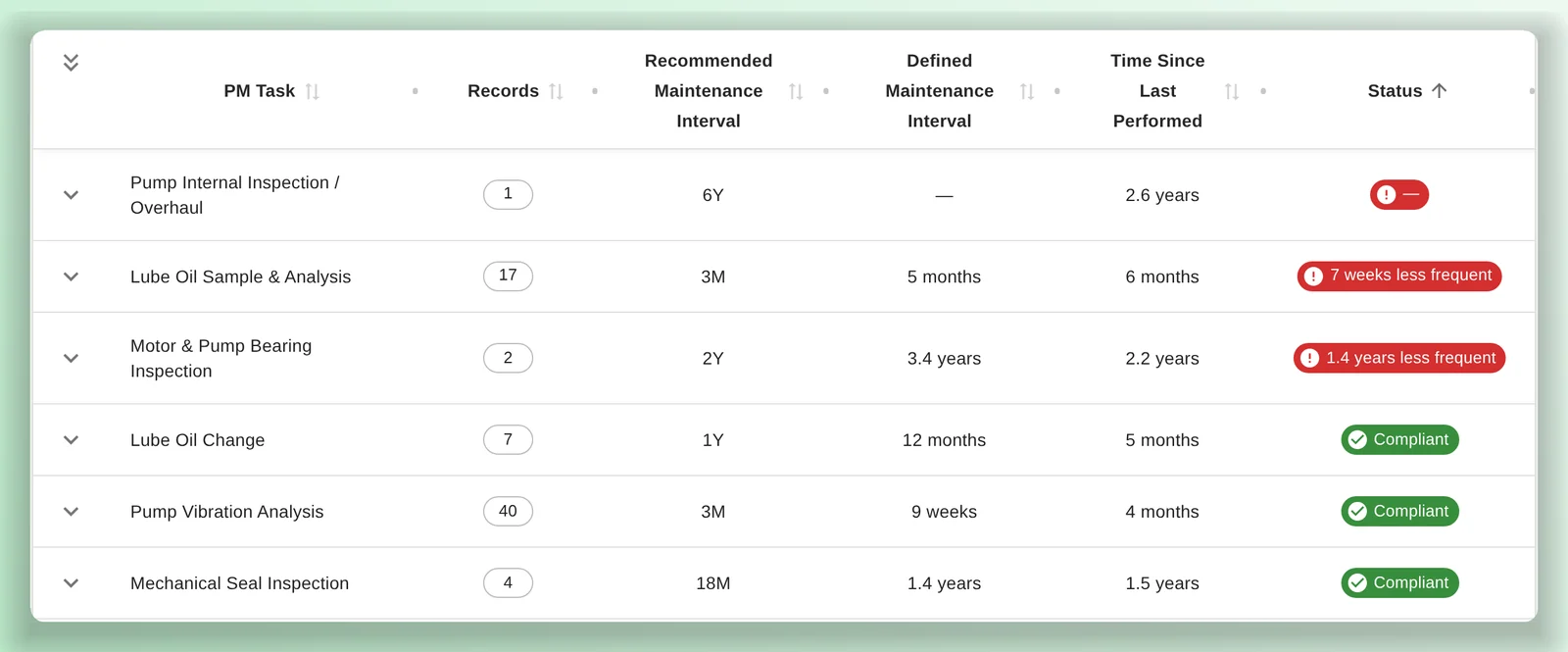
Your PM program, against the industry basis.
For each location, Equipment AI matches your PMs to the recommended tasks for its component type, criticality, duty and service. It compares the interval you've defined, and when the task was last done, with the recommended interval.
- Compliant, or how much less often than recommended.
- PM compliance by location, rolled up the hierarchy.
- Export the comparison to CSV.
Recommendations come from the PM basis database you provide. Changing a PM interval stays with your PM program.
A first look at each alarm. An answer about any sensor.
Equipment AI gives each alarm firing a first-pass disposition for your monitoring team, and answers engineers' questions about the sensors and locations they pick.
Query_Time_Series_DataQuery_Rounds_ReadingsExample conversation with synthetic details. Answers come with plots and the records behind them; your engineers decide what to do.
Alarm triage
For each alarm firing, Equipment AI proposes a disposition with its reasoning, for your monitoring team to review.
Alarms are grouped by your PI Asset Framework tree, and each one has an investigation plan your engineers can edit. Setpoint changes go through your own engineering approval.
Your hierarchy, your records, your procedure
PI Asset Framework hierarchy
Import your PI AF export to build the site, unit, system and equipment tree, with sensors attached where they belong.
Your records
Work orders and work order logs, condition reports, operator rounds and narrative logs, alarms, sensor data and manual readings, each as its own source with when it last updated.
Scheduled analysis
Daily, weekly or on your own schedule, so scores are fresh for each review.
Custom systems
Group any sensors and locations for a question, and share the view by link.
Your analysis procedure
The steps and scoring rubric each analysis follows are your plant's to edit.
What it is not
Equipment AI doesn't predict failure dates, and it isn't your maintenance program. It reads your data, explains what it sees and recommends what to look at; it doesn't change PM intervals or setpoints. Your engineers and your programs decide.
Your plant data stays in your Nuclearn deployment.
Sensor data, records and analyses live in your plant's datasets on the Nuclearn platform, in Nuclearn's own datacenter, and access goes through the platform's sign-in and roles.
Single-tenant, hosted by Nuclearn
Each plant gets its own instance, hosted by Nuclearn in our own datacenter on our own hardware. Azure Government or your own servers on request.
Built for 10 CFR Part 810
How Equipment AI is hosted, operated and supported is set up for 10 CFR Part 810 export controls.
Data sent from your side
A small broker on your network sends the data Equipment AI asks for. The platform doesn't reach into your plant network.
Sign-in and roles
Single sign-on through your identity provider, or the platform's own accounts. Platform roles decide who can view Equipment AI, change its configuration and manage scheduled analyses.
Advisory by design
Analyses and alarm dispositions are recommendations. Equipment AI doesn't change setpoints, PM intervals or work orders.
A certified company
Nuclearn is ISO/IEC 27001:2022 certified. Equipment AI is switched on per deployment.
Questions plants ask first
What data does it need?
Your PI Asset Framework hierarchy and the sensor data under it, plus work orders, condition reports and operator rounds. Narrative logs, alarms and manual readings add to the picture. Equipment AI works with the sources you have and tells you when one goes quiet.
Does it connect to PI directly?
No. A small broker on your side sends the sensor data Equipment AI asks for, in PI Web API format, so the platform never reaches into your plant network.
How is the health score worked out?
An AI analysis follows your plant's analysis procedure and scoring rubric: sensors first, then work orders, condition reports, rounds and PM adherence. It records the score, a verdict, its key findings with evidence, recommended actions and how confident it is. Your plant can edit the procedure, and engineers' feedback is used on the next run.
Where do the PM recommendations come from?
From the PM basis database you provide. Equipment AI matches your PMs to its recommended tasks for each piece of equipment and compares the intervals.
Does it predict when equipment will fail?
No. It shows the current health of each location and how it has trended, with the reasons. It doesn't forecast failure dates.
Where does it run, and who can sign in?
Each plant runs in its own single-tenant instance, hosted by Nuclearn in our own datacenter on our own hardware, with hosting, operations and support set up for 10 CFR Part 810 export controls. Azure Government or your own servers on request. People sign in through the platform, with single sign-on if you use it, and platform roles decide what each person can see and change.
See a station's health, explained.
We'll walk through a synthetic station: the heat map, a critical pump's analysis and its PM intervals, and how alarms get a first-pass disposition. Then we'll answer your IT team's questions about data, deployment and sign-in.
- A live walkthrough on synthetic equipment data
- Your questions on data, deployment and sign-in
- Which of your systems to start with
Nuclearn Equipment AI is backed by Nuclearn, whose products serve over 70 facilities in North America and the U.K.
Book a demo
Tell us a little about your site and we'll set up a time.
Thanks, we've got it.
We'll be in touch to set up a time. If it's urgent, email contact@nuclearn.ai.
Prefer email? contact@nuclearn.ai